

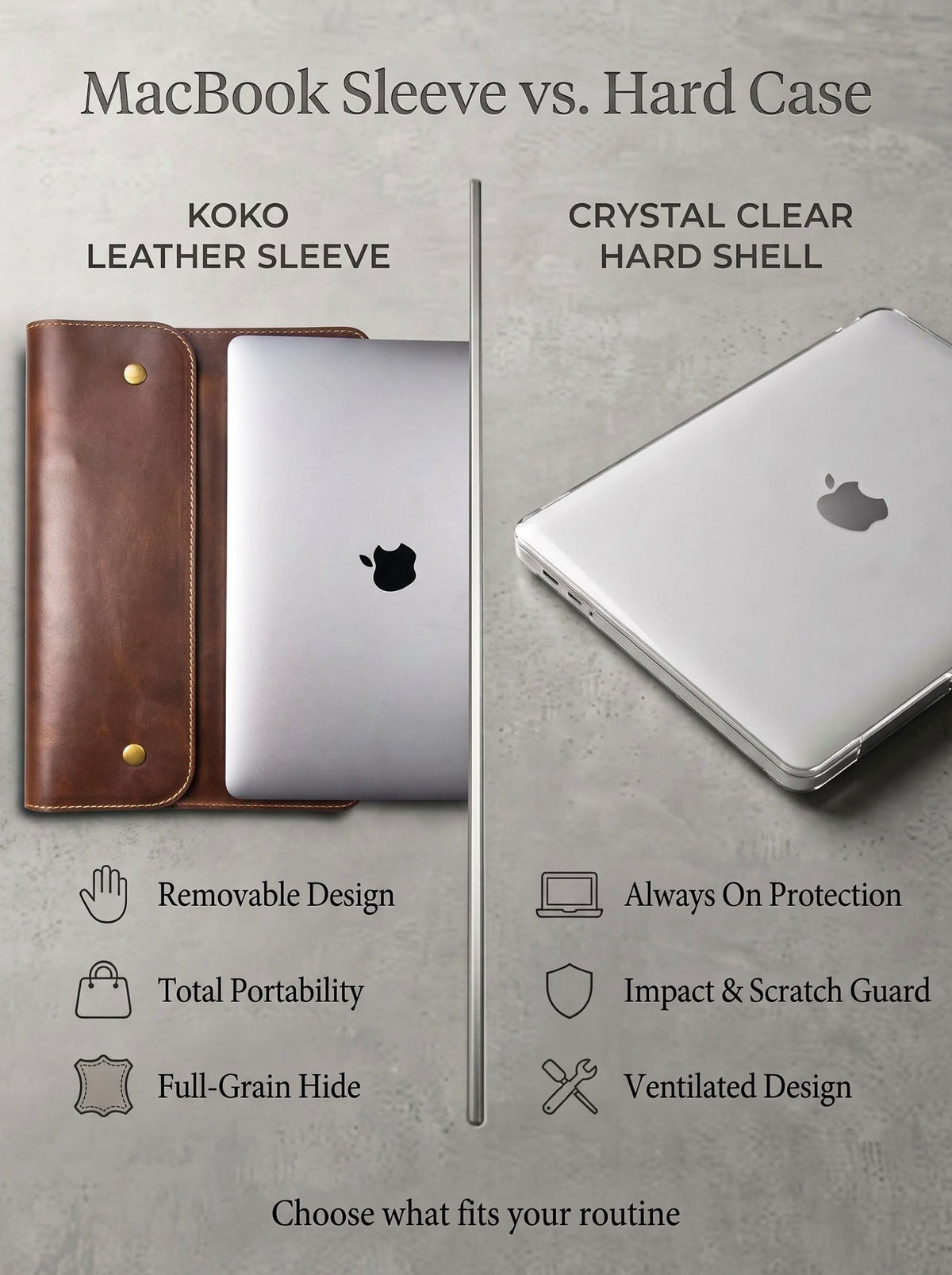
Leather MacBook Sleeve vs. Hard Case: Which Is Better for Your MacBook?
A MacBook sleeve and a snap-on hard case serve different purposes. A sleeve is a removable cover for carrying and storing your laptop, while a hard case stays attached during use. The better choice depends on your routine, the fit of the accessory, and the protection you need.
In this leather MacBook sleeve vs. hard case comparison, we look at everyday coverage, fit, care, and style to help you choose without assuming that either option makes your laptop damage-proof.
MacBook Sleeve vs. Hard Case: Quick Comparison
| Consideration | Leather Sleeve | Snap-On Hard Case |
|---|---|---|
| When it provides coverage | While the laptop is inside the sleeve during storage or transport. | While attached, including when the laptop is open. |
| Everyday scratches | Separates the laptop from other items in your bag. Keep the interior free of debris. | Covers the exterior panels it attaches to. Check underneath for dust and grit. |
| Drop protection | Depends on padding, construction, closure, and any product-specific testing. | Depends on material, construction, coverage, and any product-specific testing. |
| Fit | Check internal dimensions and compatibility with your exact laptop. | Choose a case designed for your exact MacBook model and generation. |
| During use | Removed before working, leaving no cover attached to the laptop. | Remains attached; check that vents, ports, and movement are unobstructed. |
| Style and care | Leather offers a natural finish that may develop a patina. Follow the product’s care instructions. | Available in different finishes and colors. Follow the manufacturer’s cleaning instructions. |
1. Protection During Your Commute
If you carry your MacBook between home, work, and cafés, a sleeve gives it a dedicated cover inside your bag. It can help reduce contact with items such as keys, chargers, and notebooks.
Not every leather sleeve is padded or impact-tested. Leather thickness alone does not establish drop protection, and neither a sleeve nor a basic snap-on case should be treated as a guarantee against falls or crushing. If impact protection is your priority, look for product-specific testing and consider a bag with a dedicated padded laptop compartment.
2. Coverage While You Work
A hard case’s main practical advantage is that it stays on while you use your laptop. It covers the exterior areas it attaches to, which may suit you if you want a barrier against everyday surface contact.
A sleeve is different: you take the laptop out before working. That leaves the MacBook uncovered during use but avoids having an accessory permanently attached. Neither option should be assumed to protect the keyboard, ports, or internal components from spilled drinks.
With either option, cleanliness matters. Check the inside of your sleeve and beneath a removable hard case for dust or grit, and clean them according to the manufacturer’s instructions.
3. Fit, Hinges, and Screen Clearance
Fit matters more than a general claim that one accessory type is always safer. Do not assume every hard case damages hinges, or that every sleeve fits every MacBook.
For a snap-on case, check compatibility with your exact model and generation. Do not force clips into place or keep using a case that interferes with opening, closing, or access to ports.
For a sleeve, check the listed dimensions and compatibility before buying. The laptop should slide in and out without forcing the closure. A sleeve is removed during use, so it does not add an attached cover to the display lid.
4. Ventilation During Use
Remove your MacBook from its sleeve before switching it on or working. Use it on a firm, stable surface and keep ventilation openings clear rather than resting it on a soft cover.
If you choose a hard case, check that its design leaves the relevant openings unobstructed and follow your laptop and accessory manufacturers’ guidance. Without testing a specific laptop and case together, it is not reasonable to promise that a sleeve will improve performance or that a hard case will cause overheating.
5. Durability and Personal Style
A leather sleeve suits someone who enjoys a natural material and a removable everyday-carry accessory. Leather may develop changes in color and texture with use, often described as a patina. How it ages depends on the leather, care, and conditions.
A hard case may appeal if you prefer an attached cover or a particular color or finish. Inspect it for worn clips, cracks, or changes in fit, and replace it when needed.
There is no single lifespan for either option. Compare construction, care requirements, and how well the accessory suits your routine rather than relying on a fixed number of months or years.
Frequently Asked Questions
Do hard cases damage MacBook hinges?
It is too broad to say that all hard cases damage hinges. Compatibility, fit, and design matter. Choose a case intended for your exact model, follow the fitting instructions, and stop using it if it interferes with normal opening or closing.
Is a leather sleeve enough protection for a MacBook Air or Pro?
A sleeve can be useful for everyday storage and carrying, but the protection depends on its construction and how you transport your laptop. Do not assume a leather sleeve includes padding, a particular lining, or tested drop protection unless the product details confirm it.
Can you put a MacBook with a hard case inside a leather sleeve?
Sometimes, but check the fit first. A hard case adds to the laptop’s overall dimensions, and a close-fitting sleeve may not accommodate it. Compare measurements and do not force the laptop into the sleeve.
Should I choose a sleeve or a hard case?
Choose a sleeve if your priority is a removable cover for storage and transport. Choose a compatible hard case if your priority is exterior coverage while you work. For either option, match the accessory to your exact laptop and your daily routine.
Which Should You Choose for Your MacBook?
For a commute-focused setup and the feel of natural leather, a leather sleeve is a practical option to consider. If you prefer a cover that remains attached during use, a well-fitting hard case may better suit your needs.
The best choice is the one that fits correctly and offers the features you actually need. Check dimensions, materials, and any protection claims before buying.
Shop Our Leather MacBook Covers
Explore Koko Leather’s black and brown options below. Check the dimensions and product details on each page to confirm suitability for your MacBook.
Black Leather MacBook Cover

Shop the Black Leather MacBook Cover
Brown Leather MacBook Cover

Shop the Brown Leather MacBook Cover
Complete your everyday carry: explore All Wallets.

Leave a comment
This site is protected by hCaptcha and the hCaptcha Privacy Policy and Terms of Service apply.